
Virtual number
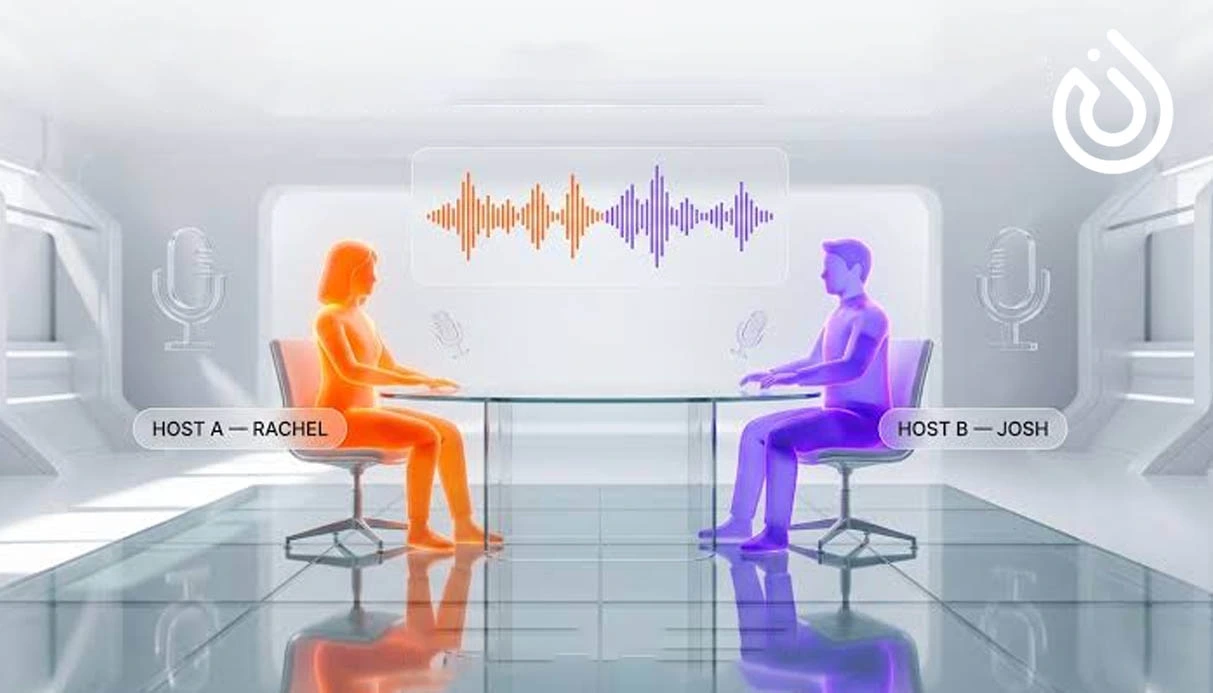

In 2026, producing a podcast no longer depends on professional studios, expensive microphones, advanced editing teams, or experienced voice actors. The rapid growth of artificial intelligence tools has made it possible for almost anyone to create a high-quality podcast using only an idea, a simple text, or even a PDF file.
AI tools can now help with almost every stage of podcast production, from brainstorming ideas, writing scripts, and converting text into voice to removing noise, automatic editing, generating subtitles, creating video versions, and even turning podcast episodes into social media content.
This is why search terms such as “AI podcast creation,” “best AI tools for podcasts,” “create a podcast with ChatGPT,” and “AI voice generation for podcasts” have become increasingly popular among content creators, teachers, YouTubers, businesses, and even beginners.
Tools such as Google NotebookLM, ElevenLabs, Descript, Adobe Podcast, Fliki AI, Wondercraft, and Riverside each simplify a specific part of the podcast production process. Some are designed for creating natural-sounding voices, some are best for editing and noise removal, and others can turn text, articles, educational files, or website links into podcast-like audio conversations.
In this article, we will review the best AI podcast creation tools in 2026, explain the use case of each one, and provide a step-by-step guide to creating a professional podcast with AI.
When we talk about AI podcast creation, we are not only talking about generating a narrator’s voice. AI can play a role in almost every stage of podcast production.
For example, if you do not have an idea for your next episode yet, you can use ChatGPT or Gemini to suggest attractive podcast topics. If you have already chosen your topic, the same tools can prepare a complete script, a two-person dialogue, an introduction, a conclusion, and even interview questions.
In the next step, tools such as ElevenLabs, Speechify, Fliki AI, and Wondercraft can turn your script into natural-sounding audio. If you have recorded your own voice, tools like Adobe Podcast, Descript, Riverside, and Krisp can remove background noise, echo, long silences, mistakes, and unnecessary parts.
Even after the episode is produced, artificial intelligence can still be useful. Tools such as Castmagic, Opus Clip, and Vidyo AI can turn your podcast into episode summaries, Instagram captions, blog posts, newsletters, highlights, and short clips for social media.
So, AI is not just a side tool. It can act as a complete assistant for creating, editing, repurposing, and marketing your podcast.
AI has several important applications in podcast production. Understanding them will help you choose the right tool more easily.
The first use is idea generation and podcast scriptwriting. Tools like ChatGPT and Gemini can write a full podcast script based on your topic, target audience, brand tone, and episode length. This is especially helpful for people who do not know how to start an episode.
The second use is text-to-speech conversion. Tools such as ElevenLabs, Fliki AI, Murf AI, and Speechify can convert written text into audio using male or female voices, formal or friendly tones, and even different languages.
The third use is automatic audio editing. Descript is one of the best tools in this area because it allows you to edit audio like a text document. This means that if you delete a sentence from the transcript, the same section is also removed from the audio file.
The fourth use is noise removal and audio enhancement. Adobe Podcast and Krisp are suitable for people who record at home, in an office, or with a mobile phone and want their audio quality to sound more like a studio recording.
The fifth use is turning podcasts into multipurpose content. A single audio episode can be converted into a blog post, social media caption, newsletter, short video, subtitle, or summary. This increases the value of your content significantly.
In the following sections, we will review the best AI tools for podcast creation based on their use cases, advantages, limitations, and suitability for different types of users.
Google NotebookLM is one of the most interesting AI tools for creating educational and conversation-style podcasts. This tool allows you to upload sources such as PDFs, text files, articles, website links, or educational notes and turn them into an audio conversation.
The output of NotebookLM usually sounds like a two-host podcast. Two AI hosts discuss your content, explain important points, and simplify the topic for listeners. This feature is especially useful for students, teachers, educational content creators, bloggers, and anyone who wants to turn articles or study materials into audio content.
The biggest advantage of NotebookLM is its simplicity. You do not need complicated settings or prior audio editing experience. You simply upload your sources and receive an audio output.
However, the tool also has limitations. For example, your control over voice selection, tone, delivery style, and the exact structure of the episode is limited. Therefore, if you are looking for a fully customized podcast with your own brand voice, NotebookLM may not be your final choice. But for quick production, educational content, and converting files into audio conversations, it is one of the best options.
ElevenLabs is one of the most well-known and professional AI voice generation tools. This platform has become popular among content creators, YouTubers, podcasters, dubbing studios, and international businesses because of its highly natural audio quality.
With ElevenLabs, you can enter your podcast script and receive a natural-sounding audio output. You can also choose from different voices, adjust tone, change speed, and, in some plans, use voice cloning. Voice cloning allows you to create a voice similar to your own voice or a selected speaker’s voice.
One of ElevenLabs’ major strengths is its high-quality output in different languages. This tool is a powerful option for projects where voice quality matters. If you want to create storytelling podcasts, educational episodes, promotional audio, or brand-based podcasts without making the output sound robotic, ElevenLabs can be a great choice.
The main limitation of ElevenLabs is that its professional features are usually available in paid plans. Also, to get a truly natural output, you need to prepare your text with proper punctuation, clear sentence structure, and logical pauses.
Descript is one of the best AI tools for podcast and video editing. Its unique feature is that it transcribes your audio file into text and allows you to edit the audio by editing the text.
For example, if you made mistakes while recording, repeated a sentence, or included a long unnecessary section, you can simply delete that part from the transcript. Descript automatically removes the same section from the audio file.
This feature is extremely useful for podcasters who do not have professional editing experience.
Descript also offers features such as removing long silences, improving audio quality, generating subtitles, editing video podcasts, and exporting content for social media. Its Studio Sound feature can also make recorded audio clearer, cleaner, and more professional.
However, Descript is more suitable for editing recorded audio than creating a podcast completely from scratch. This means it is better to first record your voice or generate the voice with another tool, then use Descript for editing and improving the final result.
Adobe Podcast is one of the most popular AI tools for improving audio quality. If you have recorded your voice with a basic microphone, laptop, or mobile phone and your audio has noise, echo, or low quality, Adobe Podcast can significantly improve the final output.
The Enhance Speech feature in Adobe Podcast is designed to make raw audio sound more like studio-quality recording. This tool is useful for teachers, beginner podcasters, educational video creators, and anyone recording in a non-professional environment.
One major advantage of Adobe Podcast is its ease of use. In most cases, you simply upload your audio file and download the enhanced version.
Of course, if the original file is extremely poor or has too much noise, the output may sometimes sound unnatural. Therefore, it is always better to record the original audio in a quiet environment whenever possible.
Fliki AI is suitable for users who want to turn text, articles, or scripts into audio or video content. This tool is useful for short podcasts, educational content, social media videos, and simple narration.
Fliki AI supports different languages and provides a variety of voices. You can enter your text, select a voice, and generate audio or video output. This feature is especially useful for businesses that want to convert their website content or blog articles into audio or video formats.
The main strengths of Fliki are speed and a simple user interface. However, for highly professional projects or podcasts that require emotional delivery, advanced tone control, or detailed editing, you may need to use additional tools such as Descript or Adobe Podcast.
Wondercraft AI is another interesting tool for creating podcasts with artificial intelligence. This platform can turn notes, short texts, links, or raw ideas into scripts and then produce them using AI voices.
One of Wondercraft’s advantages is that it makes the podcast production process very simple for beginners. If you do not know how to write a podcast script, choose a narrator, or create the first version of your episode, this tool can guide you through a step-by-step process.
Wondercraft is suitable for educational podcasts, promotional episodes, product introductions, audio newsletters, and brand-based content. However, if you need very detailed editing, professional multi-layer audio production, or full control over every detail, you may need to use it alongside more specialized tools.
Speechify is mostly known as a text-to-speech tool. It is suitable for creating solo narration audio, reading articles, producing short audiobooks, or converting educational text into audio.
If your podcast has a narrative style and you want to convert a prepared text into natural-sounding audio, Speechify can be a good option. It is especially useful for turning website articles, educational texts, or long notes into audio files.
However, Speechify is not the best choice for interview-style, conversational, or multi-speaker podcasts. In those cases, it is better to use tools such as NotebookLM, ElevenLabs, or specialized recording and editing platforms.
If you plan to create interview-style podcasts and your guest is in another city or country, Riverside is one of the most useful tools for remote podcast recording. This platform allows you to record high-quality audio and video from guests remotely.
Riverside’s key advantage is local recording. This means the output quality is less affected by weak internet connections. This is especially important for video podcasts, business interviews, webinars, and multi-person episodes.
Riverside also offers features such as audio transcription, short clip generation, social media outputs, and file management. For podcasters who work with guests, it is a serious and professional tool.
| Tool | Best Use Case | Suitable for Non-English Content | Main Strength | Limitation |
|---|---|---|---|---|
| Google NotebookLM | Turning files and text into conversational podcasts | Acceptable | Fast production from educational sources | Limited control over voice |
| ElevenLabs | Natural voice generation and voice cloning | Good | Very high voice quality | Professional features are paid |
| Descript | Text-based podcast editing | Partial | Edit audio like text | Requires learning |
| Adobe Podcast | Noise removal and audio enhancement | Depends on input file | Simple and fast | May sometimes sound unnatural |
| Fliki AI | Text-to-audio and text-to-video | Medium to good | Fast and easy interface | Limited control for professional projects |
| Wondercraft AI | Automatic podcast creation from ideas | Acceptable | Beginner-friendly | More limited editing features |
| Speechify | Text-to-speech narration | Good in suitable plans | Great for solo narration | Weak for conversations |
| Riverside | Remote podcast interviews | Yes, for recording | High recording quality | Less focused on voice generation |
To create a professional podcast with AI, you do not need to combine several complicated tools from the beginning. It is better to divide the production process into a few simple steps.
Before anything else, you need to know what your podcast is about. The topic should be attractive to your audience and also have enough potential for multiple episodes.
For example, topics such as artificial intelligence, online business, migration, lifestyle, health, technology, psychology, books, and investment are among the most popular podcast categories.
You can use ChatGPT to choose a topic. For example, you can write:
“Suggest 20 attractive episode ideas for an English podcast about artificial intelligence. The target audience is people aged 20 to 35.”
A successful podcast is not only about having a good voice. It must clearly know who it is created for.
Is your audience made up of students or business owners? Are they beginners or professionals? Are they looking for education or entertainment? Do they prefer a formal tone or a friendly one?
Once you understand your audience, choosing the tone, structure, examples, and even the voice generation tool becomes much easier.
After choosing the topic, you need to prepare the podcast script. A script can be written word-for-word, or it can simply include the main points and headings of the episode. If you are a beginner, it is better to write a complete script at first so your episode sounds more organized.
A useful prompt for scriptwriting is:
“Write a complete 8-minute podcast script about the impact of artificial intelligence on content creation. The tone should be friendly, clear, and professional. Include an engaging introduction, three main sections, real examples, a conclusion, and a final call to action.”
A text written for a blog is different from a text written to be spoken. A podcast script should be simple, smooth, and conversational. Very long sentences, heavy phrases, and complicated paragraphs can make the audio output sound artificial or boring.
To improve AI voice delivery, use commas, periods, ellipses, and dashes. These punctuation marks help text-to-speech tools create more natural pauses.
Once the script is ready, go to a voice generation tool. If quality is very important to you, ElevenLabs is a good choice. Enter your text, select the language, choose the right voice, and generate the output.
It is better to create several versions of each episode with different speeds, tones, or voices and then choose the best one. Sometimes a small change in punctuation or voice selection can greatly improve the final quality.
If you have recorded your own voice, you can upload the file to Adobe Podcast or Descript to reduce noise, echo, and other audio issues. Even if you have generated the voice with AI, you can still use editing tools for final adjustments, silence removal, and quality improvement.
Intro music, short effects, and background sounds can make your podcast sound more professional. However, you should not overuse music. Background audio should be soft and should not interfere with the narrator’s voice.
When choosing music, make sure to use licensed, royalty-free, or copyright-safe audio files.
In the final step, upload your audio file to podcast publishing platforms. Services such as Spotify for Podcasters, Apple Podcasts, Castbox, Buzzsprout, and other podcast hosting platforms can be used to publish episodes.
For each episode, choose an attractive title, complete description, relevant keywords, and a proper cover image. These elements have a major impact on podcast discoverability.
Using a tool is not enough to create a natural and professional podcast. You should also follow a few important tips.
First, do not make the script too formal. Podcasting is an audio-based medium, and listeners should feel like they are hearing a real person. Therefore, the script should sound conversational, simple, and smooth.
Second, choose the voice speed based on the topic. For educational or analytical podcasts, slower speed and more pauses are better. For news or entertainment podcasts, a slightly faster pace can be more engaging.
Third, start the episode strongly. In the first 30 seconds, you should tell listeners why they should continue listening. A strong question, interesting statistic, short story, or educational promise can be a good opening.
Fourth, generate multiple versions. Professionals usually do not publish the first AI output. They revise the text, generate the audio again, and choose the best version.
Fifth, after publishing the podcast, turn the same episode into several other content formats. For example, create a blog post, Instagram posts, a short video, tweets, or LinkedIn posts. This allows you to get multiple marketing assets from one main piece of content.
Here are a few ready-to-use prompts that you can use in ChatGPT or similar tools.
“Write a complete 10-minute podcast script about ‘the best AI tools for content creation.’ The tone should be friendly, educational, and professional. The structure should include an introduction, five tool introductions, a practical example for each tool, a conclusion, and a final call to action.”
“Write a two-person English podcast dialogue about ‘the future of artificial intelligence in small businesses.’ The first speaker should have a formal and analytical tone, while the second speaker should have a friendly and simple tone. Include questions and answers, real examples, and a conclusion.”
“Turn the following text into a 7-minute podcast script. The tone should be conversational, smooth, and engaging. Use short sentences, add a curiosity-driven introduction, and include a practical conclusion at the end.”
Choosing the best AI podcast creation tool depends on your goal. If you want to quickly turn files and articles into an audio conversation, NotebookLM is a good option. If natural voice quality is your main priority, ElevenLabs is a better choice. If you record your own voice and need professional editing, Descript and Adobe Podcast are worth considering.
If your podcast is interview-based, Riverside can improve recording quality. If you want to turn website texts or long articles into audio files, Speechify or Fliki AI can be useful. If you want a simple tool to create podcasts quickly from raw ideas, Wondercraft can be a good starting point.
In practice, many professional podcasters use a combination of several tools. For example, they write the script with ChatGPT, generate the voice with ElevenLabs, improve audio quality with Adobe Podcast, edit with Descript, and finally use tools like Opus Clip or similar platforms for social media content.
AI podcast creation has several important benefits. The first benefit is cost reduction. You no longer need a studio, narrator, editor, or professional equipment to get started.
The second benefit is speed. A task that previously took several days can now be completed in a few hours or even a few minutes.
The third benefit is accessibility. Many AI tools offer free versions or trial plans, allowing beginners to experience podcast production without a large budget.
The fourth benefit is multilingual content creation. With translation, dubbing, and voice cloning tools, you can publish one episode in multiple languages and reach a wider audience.
The fifth benefit is increased productivity in content marketing. One podcast episode can become an article, caption, video, newsletter, and short-form content. This means you can feed multiple content channels with a single production process.
Despite all the advantages, it is important to remember that AI still does not fully replace human creativity. Sometimes the voice output may sound too artificial, the pronunciation of certain words may not be accurate, or the narrator’s tone may not match the topic.
AI tools may also generate incorrect information. Therefore, if your podcast is educational, financial, medical, or highly specialized, you should always review the script before publishing.
Another important point is the legal and ethical issue of voice usage. If you use voice cloning, you must have permission from the owner of the voice. Using someone’s voice without consent can lead to serious problems.
Creating podcasts with artificial intelligence in 2026 is no longer a futuristic idea. It has become a real, fast, and cost-effective method for content production. Tools such as Google NotebookLM, ElevenLabs, Descript, Adobe Podcast, Fliki AI, and Wondercraft help you create high-quality audio episodes without needing complicated equipment.
If you are a beginner, you can start with a simple workflow: choose a topic, write the script with ChatGPT, generate the voice with ElevenLabs or a similar tool, and then improve the audio quality with Adobe Podcast or Descript. This simple path can help you create your first professional episode.
However, the best results come when you use artificial intelligence as an assistant, not as a complete replacement for human creativity. Choosing an attractive topic, understanding your audience, writing a strong script, and paying attention to final quality are still the most important factors in podcast success.
Also, for users who need to register on international AI platforms, verify accounts, or access services that require phone confirmation, using a buy virtual number service can make the signup and verification process easier and more accessible.


Comments